

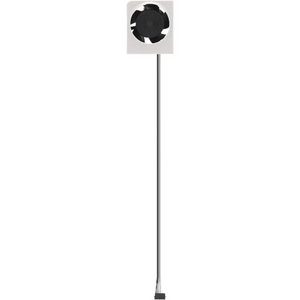

Bambu Lab Hotend Cooling Fan for A, P & X Series
Selling fast! 4 people have this in their carts.
Delivery in the UAE
Same-day delivery (Dubai only): order before 12:00 PM. Standard delivery cutoff 4:00 PM (UAE time).
- Same-day delivery: order before 12:00 PM. Currently available in Dubai only.
- Standard delivery: 1–2 business days. Order before 4:00 PM.
- Remote areas: 2–3 business days. No same-day delivery.
Orders placed after the cutoff, on Sundays or on public holidays are processed the next business day. No Sunday deliveries. Delivery times are estimates.
Check your delivery area
Return within 2 days of purchase (Original unopened package).
5% VAT included.
Guaranteed Safe Checkout

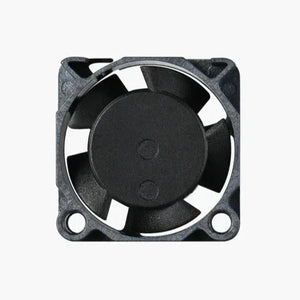
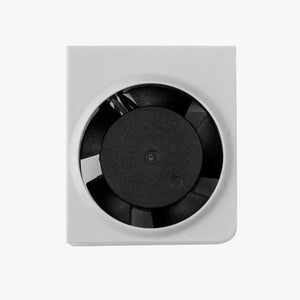
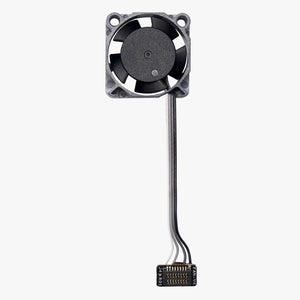
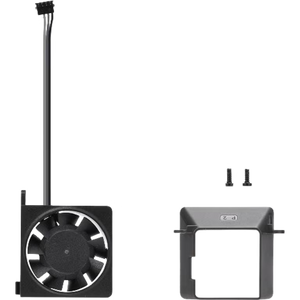
Bambu Lab Hotend Cooling Fan for A, P and X Series
The hotend cooling fan is the small fan on the front of the toolhead that keeps the hotend heatsink cool. It stops heat creeping up into the filament path, which causes clogs, under-extrusion and failed prints. Choose the version that matches your printer: A1/A1 mini, A2L, P1P/P1S, P2S, X1 Carbon, X1E or X2D. This is a genuine Bambu Lab replacement part, sold by Omnimakers in the UAE.
Key Features
- Prevents heat creep and clogs: keeps the cold side of the hotend cool so filament melts only in the nozzle.
- Genuine Bambu Lab part: same fan the printer ships with, so it fits the toolhead and connector with no modification.
- Stall protection (P1P/P1S version): the fan stops automatically if it is blocked for 1–3 seconds and restarts within 2–6 seconds. It can stay blocked for up to 72 hours without damage.
- Long service life: about 50,000 hours at 40 °C (P1P/P1S version).
- Quick to replace: a few screws and one connector. No soldering needed.
When to Replace the Hotend Cooling Fan
Replace the fan if it has become loud, rattles or runs slowly. You should also replace it if the printer shows a hotend cooling fan error, or if you see clogs and under-extrusion that start partway through long prints. A failing hotend fan is one of the most common causes of heat creep on Bambu Lab printers. Keeping a spare avoids downtime.
Which Version Do I Need?
| Your printer | Version to choose | Bambu Lab part no. | EAN |
|---|---|---|---|
| A1, A1 mini | A1 Series | FAF007 | 6975337034025 |
| A2L | A2L | FAF027 | 6937285513151 |
| P1P, P1S | P1 Series | FAF002-P | 6975337031819 |
| P2S | P2S | FAF021 | 6937285507129 |
| X1 Carbon | X1 Carbon | FAF002 | 6975337030713 |
| X1E | X1E | FAF011-V2 | 6937285509987 |
| X2D | X2D | FAF023 | 6937285509413 |
The fans are not interchangeable between printer families. For H2D, H2S or H2C printers, contact us and we will confirm the correct part.
Technical Specifications (P1P/P1S version, FAF002-P)
| Rated voltage | 5 V DC |
| Operating voltage range | 3–6 V DC |
| Rated speed | 15,500 RPM |
| Airflow | 5.03 m³/h (2.96 CFM) |
| Service life | About 50,000 hours at 40 °C |
| Stall protection | Stops after 1–3 s blocked, restarts within 2–6 s |
Compatibility
- A1 Series version: Bambu Lab A1 and A1 mini
- A2L version: Bambu Lab A2L
- P1 Series version: Bambu Lab P1P and P1S
- P2S version: Bambu Lab P2S
- X1 Carbon version: Bambu Lab X1 Carbon
- X1E version: Bambu Lab X1E
- X2D version: Bambu Lab X2D
Step-by-step replacement guides for each printer are on the Bambu Lab Wiki.
What's in the Box
- 1 × Bambu Lab hotend cooling fan for the version you choose
- P1P/P1S version: 2 × MG2.5-15 mounting screws
- P2S version: 1 × air channel and 3 × BT2×5 screws
Why Buy from Omnimakers
- Genuine Bambu Lab spare parts from a UAE-based store
- Local help choosing and fitting the right part for your printer
FAQ
What does the hotend cooling fan do on a Bambu Lab printer?
It cools the hotend heatsink so heat stays in the nozzle and does not travel up into the filament path. If it fails, filament softens too early and jams, which is called heat creep.
Is the hotend cooling fan the same as the part cooling fan?
No. The hotend fan cools the hotend and runs whenever the nozzle is hot. The part cooling fan blows air onto the printed layers to solidify them. They are different parts.
Will the P1S hotend fan fit my P2S, X1 Carbon or A1?
No. Each printer uses its own fan. Choose the version named after your printer: A1 Series for A1 and A1 mini, P1 Series for P1P and P1S, and the matching version for A2L, P2S, X1 Carbon, X1E or X2D.
How do I know my hotend fan needs replacing?
Common signs are unusual noise, a fan error on the printer screen, a fan that spins slowly or not at all, and repeated clogs during long prints.
Do you deliver across the UAE?
Yes. Delivery options and times are shown at checkout.
| Type |
Hotend Cooling Fan |
|---|---|
| compatibility |
P1 Series, A1 Series, A2L, P2S, X2D |